
Your First Forecast in Python — Step by Step
In Post 1, we learned what forecasting is. In Post 2, we learned how to measure whether a forecast is any good. In Post 3, we surveyed the Python forecasting landscape and compared the major libraries.
Now it’s time to stop reading and start doing.
By the end of this post, you will have:
- Loaded a real time series dataset
- Analyzed its patterns (trend, seasonality, difficulty)
- Generated a forecast with confidence intervals
- Compared 30+ models automatically
- Exported your results to a DataFrame or CSV
All in Python. All from scratch. No prior forecasting experience required.
What You’ll Need
Python 3.10 or later and a terminal. That’s it.
We’ll use Vectrix for this tutorial because it requires zero configuration — install it, call one function, and get a production-quality forecast. If you want to follow along with a different library, the concepts are the same; only the syntax changes.
Install Vectrix:
pip install vectrixThat’s one dependency added to your project. Vectrix bundles everything internally (NumPy, SciPy, pandas, and a Rust acceleration engine), so there’s nothing else to install.
Step 1 — Load Your Data
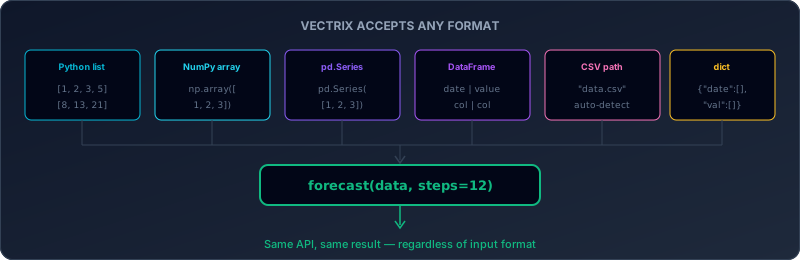
Every forecast starts with historical data. Vectrix is flexible about format — it accepts Python lists, NumPy arrays, pandas Series, DataFrames, CSV file paths, and dictionaries. You don’t need to reshape your data to fit the library. The library fits your data.
For this tutorial, we’ll use a built-in sample dataset. Vectrix ships with seven real-world datasets so you can experiment without downloading anything.
from vectrix import loadSample, listSamples

listSamples()
name frequency rows description
0 airline monthly 144 Classic airline passengers 1949-1960
1 retail daily 730 Retail store daily sales
2 stock business_daily 252 Stock closing prices
3 temperature daily 1095 Daily temperature readings
4 energy hourly 720 Energy consumption
5 web daily 180 Website pageviews
6 intermittent daily 365 Intermittent demandLet’s start with the airline dataset — 144 monthly observations of international airline passengers from 1949 to 1960. It’s the “Hello World” of time series: clear upward trend, strong yearly seasonality, and increasing variance. If you’ve ever seen a time series textbook, you’ve seen this dataset.
df = loadSample("airline")
print(df.head())
print(f"
Shape: {df.shape}")
print(f"Date range: {df['date'].iloc[0]} → {df['date'].iloc[-1]}")
date passengers
0 1949-01-01 112
1 1949-02-01 118
2 1949-03-01 132
3 1949-04-01 129
4 1949-05-01 121
Shape: (144, 2)
Date range: 1949-01-01 → 1960-12-01Two columns: date and passengers. 144 rows, one per month. Simple.
What if you have your own data? Just pass it directly:
from vectrix import forecast
import pandas as pd

df = pd.read_csv("your_data.csv")
result = forecast(df, date="your_date_column", value="your_value_column", steps=12)
Or even simpler — if you have just a list of numbers:
result = forecast([112, 118, 132, 129, 121, 135, 148, 148, 136, 119, 104, 118])No date column needed. No configuration. Vectrix figures out the rest.
Step 2 — Understand Your Data Before You Forecast
Before jumping to predictions, it’s worth understanding what you’re working with. What patterns does this data have? Is it seasonal? Is it trending? How hard is it to forecast?
This is where analyze() comes in.
from vectrix import analyze

analysis = analyze(df, date="date", value="passengers")
print(analysis.summary())
=== Vectrix Analysis ===
DNA Fingerprint: a3f1c8b2
Difficulty: medium (score: 42.3)
Category: seasonal
Characteristics:
Length: 144
Period: 12
Trend: upward (strength: 0.89)
Seasonality: strong (strength: 0.91)
Volatility: medium
Predictability: 76.4%
Outliers: 0
Recommended models: DynamicOptimizedTheta, AutoETS, AutoARIMALet’s unpack what this tells us.
DNA Fingerprint (a3f1c8b2) — A unique 8-character hash of the data’s statistical properties. Two datasets with the same fingerprint have nearly identical statistical behavior. Think of it as a data fingerprint — useful for comparing time series across projects.
Difficulty: medium (42.3/100) — How hard this data is to forecast. The airline dataset scores 42 out of 100 — moderate difficulty. It has clear patterns (good), but those patterns change over time (the seasonal peaks get taller as the years go on). Scores above 70 mean “this is going to be tough.” Scores below 30 mean “most models will do fine.”
Category: seasonal — The dominant characteristic. This data is primarily driven by recurring seasonal patterns (summer peaks, winter dips). Other categories include trending (dominated by a long-term direction), stationary (fluctuates around a stable mean), volatile (large unpredictable swings), and intermittent (lots of zeros — common in retail).
Trend: upward, strength 0.89 — There’s a strong upward trend. Airline passengers are growing over time. The strength of 0.89 (out of 1.0) means the trend is very consistent.
Seasonality: strong, strength 0.91 — There’s a repeating 12-month cycle (period = 12). People fly more in summer, less in winter. The strength of 0.91 means this pattern is very reliable.
Predictability: 76.4% — Based on the signal-to-noise ratio, about 76% of the variation in this data can be explained by patterns (trend + seasonality). The remaining 24% is noise that no model can predict.
Recommended models — Based on the DNA profile, Vectrix recommends DynamicOptimizedTheta, AutoETS, and AutoARIMA as the best candidates for this specific data pattern. Different data → different recommendations.
This is the kind of insight that usually requires a data scientist to manually inspect the data, run statistical tests, and make judgment calls. Here it happens automatically.
Why analyze before forecasting? You don’t have to —
forecast()runs its own analysis internally. But understanding your data helps you interpret the results. Ifanalyze()says “difficulty: very hard, predictability: 23%”, you’ll know that any forecast will have wide confidence intervals, and that’s expected — not a bug.
Step 3 — Generate Your First Forecast

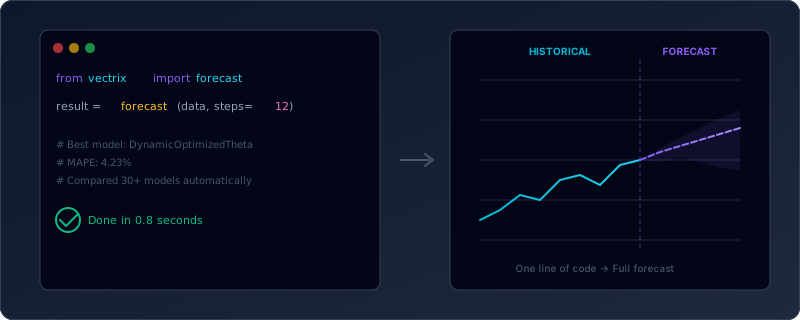
This is the moment. One function call, and you get a fully validated forecast with confidence intervals, model selection, and accuracy metrics.
from vectrix import forecast

result = forecast(df, date="date", value="passengers", steps=12)
That’s it. One line. Here’s what happened behind the scenes:
- Data validation — Vectrix checked your data for missing values, duplicates, and format issues
- DNA profiling — Extracted 65+ statistical features to understand the data’s character
- Model selection — Used the DNA profile to rank 30+ candidate models by expected fitness
- Cross-validation — Held out the last portion of data, trained each candidate model on the rest, and measured accuracy on the held-out portion
- Ensemble blending — Combined the top-performing models using weighted averaging
- Refit on full data — Retrained the winner on all available data (not just the training portion)
- Confidence intervals — Generated 95% prediction intervals around the forecast
All of that in a single function call. Let’s look at the result.
print(result.summary())=== Vectrix Forecast ===
Best model: DynamicOptimizedTheta
Horizon: 12 steps
MAPE: 4.23%
RMSE: 18.7
MAE: 15.2
sMAPE: 4.15%
Predictions (next 12):
[452, 420, 461, 445, 464, 507, 562, 559, 497, 444, 399, 438]MAPE 4.23% means the model’s average prediction is off by about 4.2% — on a dataset where passengers range from 100 to 600, that’s roughly ±20 passengers. For a real business decision (how many planes to schedule, how many staff to hire), that’s very usable.
Step 4 — Explore the Result Object
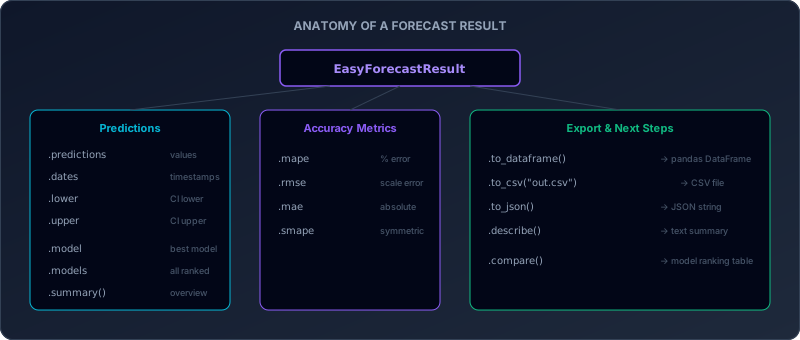
The result object contains everything you need. Let’s walk through it.
The Predictions
print(result.predictions)
print(result.dates)
result.predictions is a NumPy array of forecasted values. result.dates is a list of date strings. Together they tell you “on this date, we predict this value.”
Confidence Intervals
for date, pred, lo, hi in zip(result.dates, result.predictions, result.lower, result.upper):
    print(f"{date}: {pred:.0f}  [{lo:.0f} — {hi:.0f}]")
1961-01-01: 452 [408 — 496]
1961-02-01: 420 [375 — 465]
1961-03-01: 461 [413 — 509]
...
1961-12-01: 438 [378 — 498]The confidence intervals widen as you forecast further into the future. This is expected — uncertainty grows with time. If someone gives you a point forecast without intervals, they’re hiding the uncertainty.
By default, Vectrix uses 95% confidence. You can change this:
result_80 = forecast(df, date="date", value="passengers", steps=12, confidence=0.80)
result_99 = forecast(df, date="date", value="passengers", steps=12, confidence=0.99)
80% intervals are narrower (more precise, but wrong more often). 99% intervals are wider (almost always contain the true value, but less useful for planning).
Which Model Won?
print(f"Best model: {result.model}")
print(f"All models ranked: {result.models[:5]}")
Best model: DynamicOptimizedTheta
All models ranked: ['DynamicOptimizedTheta', 'AutoETS', 'AutoARIMA', 'AutoTBATS', 'AutoCES']result.model is the single best model. result.models is the full ranking — every model that ran successfully, sorted by MAPE (best first). This transparency lets you see not just the winner, but how close the competition was.
Accuracy Metrics
print(f"MAPE:  {result.mape:.2f}%")
print(f"RMSE:  {result.rmse:.2f}")
print(f"MAE:   {result.mae:.2f}")
print(f"sMAPE: {result.smape:.2f}%")
Four metrics, each telling you something different:
- MAPE — Percentage error. “The forecast is off by X%.” Easy to interpret, but breaks when actual values are near zero.
- RMSE — Root mean squared error. Penalizes large errors more than small ones. Good when big misses are costly.
- MAE — Mean absolute error. The simplest metric. “On average, we’re off by X units.”
- sMAPE — Symmetric MAPE. Fixes some of MAPE’s issues with values near zero.
If you read Post 2, these metrics will be familiar. In practice, MAPE is the most commonly reported, but RMSE is often more useful for decision-making.
Step 5 — Compare All Models
What if you want to see how every model performed, not just the winner?
from vectrix import compare

ranking = compare(df, date="date", value="passengers", steps=12)
print(ranking)
model mape rmse mae smape time_ms selected
0 DynamicOptimizedTheta 4.23 18.70 15.20 4.15 23.1 True
1 AutoETS 4.87 21.30 17.40 4.78 15.2 False
2 AutoARIMA 5.12 22.80 18.10 5.03 31.4 False
3 AutoTBATS 5.34 23.50 18.90 5.25 45.6 False
4 AutoCES 5.61 24.20 19.60 5.52 12.8 False
5 OptimizedTheta 5.89 25.10 20.40 5.78 8.3 False
...compare() returns a pandas DataFrame — every model, every metric, sorted by MAPE. The selected column shows which model forecast() would pick. The time_ms column shows how long each model took to fit and predict.
This is useful for several reasons:
- Sanity check — If 20 models agree on ~450 passengers and one says 800, the outlier is probably wrong
- Model diversity — If the top 5 models are all within 1% MAPE of each other, the forecast is robust
- Speed vs accuracy tradeoff — Maybe AutoARIMA is 0.5% better but 3x slower
Step 6 — Export Your Results
Forecasts are only useful if you can get them into your workflow. Here are the export options.
To a DataFrame
forecast_df = result.to_dataframe()
print(forecast_df.head())
date prediction lower95 upper95
0 1961-01-01 452.31 408.12 496.50
1 1961-02-01 420.45 375.23 465.67
2 1961-03-01 461.12 413.45 508.79
3 1961-04-01 445.67 396.34 494.99
4 1961-05-01 464.23 412.89 515.57A clean DataFrame with date, prediction, and confidence bounds. Ready for Plotly, matplotlib, or any downstream analysis.
To CSV
result.to_csv("airline_forecast.csv")One file, four columns. Open it in Excel, load it into a dashboard, send it to a colleague.
To JSON
json_str = result.to_json()
result.to_json("airline_forecast.json")
For APIs, web dashboards, or anywhere that consumes JSON.
Full Model Comparison
all_models = result.compare()
print(all_models.head())
Same as compare() but called on the result object — shows every model’s performance in a sorted DataFrame.
Putting It All Together
Here’s the complete workflow in one script, from installation to export:
from vectrix import loadSample, analyze, forecast, compare

df = loadSample("airline")

analysis = analyze(df, date="date", value="passengers")
print(analysis.summary())

result = forecast(df, date="date", value="passengers", steps=12)
print(result.summary())

ranking = compare(df, date="date", value="passengers", steps=12)
print(ranking.head(10))

forecast_df = result.to_dataframe()
result.to_csv("airline_forecast.csv")
That’s a complete forecasting pipeline:
- Load — Get historical data
- Analyze — Understand patterns and difficulty
- Forecast — Generate predictions with confidence intervals
- Compare — See how all 30+ models performed
- Export — Save results for downstream use
15 lines of code. No configuration. No hyperparameter tuning. No manual model selection. You could run this on any of the seven built-in datasets by changing the loadSample() name and the column names.
Try It with Different Data
The airline dataset is classic, but real-world data comes in many flavors. Here are two more examples to try.
High-Frequency: Retail Sales
df = loadSample("retail")
result = forecast(df, date="date", value="sales", steps=30)
print(f"Best: {result.model}, MAPE: {result.mape:.2f}%")
Daily retail data with weekly seasonality. 730 rows, much more data than the airline example. The recommended models will likely be different — daily data favors models that handle multiple seasonalities (day-of-week + month-of-year).
Sparse: Intermittent Demand
df = loadSample("intermittent")
result = forecast(df, date="date", value="demand", steps=30)
print(f"Best: {result.model}, MAPE: {result.mape:.2f}%")
Intermittent demand is full of zeros — a customer orders 5 units on Monday, nothing on Tuesday through Friday, 3 units next Monday. Standard models like ARIMA and ETS struggle with this because they assume continuous demand. Vectrix automatically selects Croston-family models (SBA, TSB) that are designed specifically for intermittent patterns.
Your Own Data
import pandas as pd

df = pd.read_csv("my_data.csv")
result = forecast(df, date="timestamp", value="revenue", steps=6)
Replace the column names with whatever your CSV uses. If Vectrix can’t auto-detect the date and value columns, just specify them explicitly with date= and value=.
Going Deeper — What’s Next?
This post gave you the minimum viable forecast — load data, forecast, export. But there’s much more you can do.
Want to dig deeper into the data before forecasting? The Analysis & DNA tutorial walks through every feature of analyze() — changepoints, anomalies, the full DNA profile, and how to use the 65+ extracted features for your own analysis.
Want to understand the 30+ models and how they work? The Models tutorial covers each model family (ETS, ARIMA, Theta, GARCH, neural networks), when to use each, and how to access models directly for full control.
Want to see forecasting applied to a real business problem? The showcase notebooks demonstrate full end-to-end workflows — sales forecasting dashboards, demand planning, anomaly detection — with interactive Plotly visualizations.
Want to control which models run? Use the models parameter:
result = forecast(df, date="date", value="passengers", steps=12,
                  models=["auto_ets", "auto_arima", "dot"])
Want a specific ensemble strategy?
result = forecast(df, date="date", value="passengers", steps=12,
                  ensemble="median")
Options: 'mean' (simple average), 'weighted' (accuracy-weighted), 'median' (robust to outlier models), 'best' (single best model, no blending).
Key Takeaways
Forecasting doesn’t require expertise to start. One function call, one result. The library handles model selection, validation, and ensemble blending automatically.
Always analyze before you forecast (or at least, read the summary). Understanding your data’s difficulty, seasonality, and trend helps you interpret the results — and know when to trust them.
Confidence intervals matter more than point predictions. A prediction of “450 passengers” means nothing without knowing whether the range is [440, 460] or [300, 600]. Always report intervals.
Compare models, don’t just pick one. The
compare()function shows you the full landscape. If 20 models agree, you can be more confident. If they disagree wildly, the data is probably hard to forecast.Export in the format you need. DataFrames for analysis, CSV for spreadsheets, JSON for APIs. The forecast is only valuable if it reaches the decision-maker.
What’s Next in This Series?
In upcoming posts:
- Forecasting Models Explained — ETS, ARIMA, Theta, DOT, GARCH, Croston — what each one does, when it shines, and why diversity matters
- The Art of Model Selection — How automatic model selection works under the hood, and why it usually beats manual picking
Ready to try it yourself? Install Vectrix in 10 seconds and run the code above:
pip install vectrixOr explore the full documentation and tutorials for more.