
Python Forecasting Libraries Compared — Which One Should You Use?

In Post 1, we learned what forecasting is. In Post 2, we learned how to tell if a forecast is any good. Now the natural next question — what tool should I actually use?
If you search “Python forecasting library” today, you’ll find dozens of options. Some have been around for a decade. Some launched last year. Some have 20,000 GitHub stars. Some have 200. Some focus on speed. Some focus on deep learning. Some try to do everything.
This post is the guide I wish I had when I started. We’ll walk through the major libraries, what each one does well, where each one struggles, and — most importantly — how to pick the right one for your situation.
No single library is best for everything. The goal is to match the tool to the problem.
The Landscape at a Glance
The Python forecasting ecosystem roughly divides into three camps.
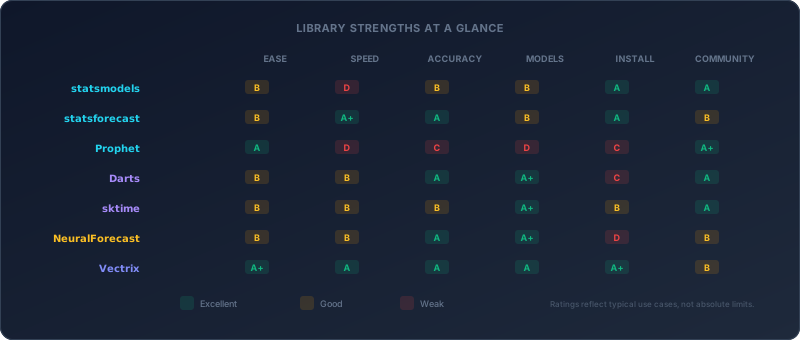
Statistical libraries implement classical methods (ETS, ARIMA, Theta) that have dominated forecasting for decades. They’re interpretable, fast to fit, and work well on small to medium datasets. Think of them as the reliable workhorses.
Hybrid / all-in-one libraries combine statistical and machine learning approaches under a unified API. They prioritize breadth — one interface to access dozens of models from simple exponential smoothing to transformer neural networks.
Deep learning libraries focus on neural network architectures. They shine with large datasets, multiple related time series, and complex patterns that statistical models can’t capture. They require more data, more compute, and more expertise.
Let’s meet each one.
The Statistical Camp
statsmodels — The Academic Standard
GitHub: statsmodels/statsmodels (11,000+ stars) | Latest: v0.14.6
If you’ve taken a statistics or econometrics course, you’ve probably used statsmodels. It’s the Python equivalent of R’s stats package — comprehensive, well-documented, and academically rigorous.
What it offers
- ARIMA, SARIMAX, exponential smoothing (ETS), VAR, VECM, state space models
- Full statistical diagnostics: ACF/PACF plots, residual tests, ADF/KPSS stationarity tests, Granger causality
- Detailed summary tables that feel like reading a journal paper
- Regression analysis (OLS, GLS, WLS, quantile regression)
Code example
from statsmodels.tsa.holtwinters import ExponentialSmoothing

model = ExponentialSmoothing(
    data,
    trend="add",
    seasonal="add",
    seasonal_periods=12
)
fit = model.fit()
forecast = fit.forecast(steps=12)
Who should use it
statsmodels is ideal when you need statistical rigor — parameter confidence intervals, hypothesis tests, model diagnostics. If you’re writing a research paper, building an econometric model, or need to explain every coefficient to a statistician, this is your tool.
The tradeoffs
- No auto-selection. You must choose the model, set the parameters, check the diagnostics, and iterate. There’s no
auto_arima()orauto_ets()built in. For beginners, this is a steep learning curve. - Slow. Pure Python/NumPy implementation with no Numba or Cython acceleration. Fine for one time series, painful for thousands.
- Forecasting isn’t the focus. statsmodels is a general statistics library. Forecasting is one chapter, not the whole book.
Best for: Researchers, econometricians, anyone who needs publishable statistical output.
statsforecast — The Speed Machine
GitHub: Nixtla/statsforecast (4,700+ stars) | Latest: v2.0.3
If statsmodels is the professor, statsforecast is the Formula 1 car. Built by Nixtla, it reimplements classical statistical models with Numba JIT compilation to achieve extraordinary speed.
How fast?
- 20x faster than pmdarima (Python auto_arima)
- 500x faster than Prophet
- 4x faster than statsmodels ETS
- Can process 1 million time series across 10 models in under 5 minutes
These aren’t marketing claims — they’re reproducible benchmarks published with code.
What it offers
- AutoARIMA, AutoETS, AutoCES, AutoTheta, DynamicOptimizedTheta, MSTL, TBATS
- Automatic model selection (the “Auto” prefix means it searches for optimal parameters)
- Distributed processing via Ray or Spark for massive-scale workloads
- Part of the broader Nixtla ecosystem (more on this below)
Code example
from statsforecast import StatsForecast
from statsforecast.models import AutoARIMA, AutoETS, AutoCES

sf = StatsForecast(
    models=[AutoARIMA(), AutoETS(), AutoCES()],
    freq="M",
    n_jobs=-1
)
forecasts = sf.forecast(df=data, h=12)
The Nixtla ecosystem
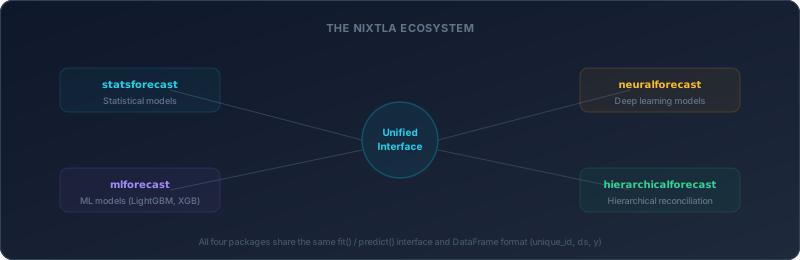
statsforecast doesn’t exist in isolation. Nixtla has built four complementary packages that share the same fit()/predict() interface and DataFrame format (unique_id, ds, y)
- statsforecast — Statistical models (what we’re discussing)
- neuralforecast — Deep learning models (N-BEATS, PatchTST, iTransformer)
- mlforecast — ML models (LightGBM, XGBoost, sklearn)
- hierarchicalforecast — Hierarchical reconciliation (top-down, bottom-up, MinTrace)
This modularity is elegant — learn one API, use all four. But it also means installing separate packages for each paradigm.
The tradeoffs
- Requires a specific DataFrame format. Your data must have
unique_id,ds, andycolumns. If you’re working with a simple pandas Series, there’s a conversion step. - Forecasting only. No diagnostics, no statistical tests, no regression. It predicts — that’s it.
- Less flexibility per model. The “Auto” wrappers make smart defaults but hide some knobs. If you need to manually set ARIMA(2,1,3)(1,1,1,12) with specific constraints, statsmodels gives you more control.
Best for: Production environments forecasting thousands or millions of time series. If speed is your bottleneck, nothing else comes close.
Prophet — The Household Name
GitHub: facebook/prophet (20,000+ stars) | Latest: v1.3.0
Prophet is the most famous forecasting library in the world. Created by Meta (Facebook) in 2017, it was designed for business analysts — people who understand their data but aren’t statisticians.
With 20,000+ GitHub stars, it dwarfs every other library on this list. But fame and accuracy are different things.
What it offers
- Decomposable model: trend + seasonality + holidays + regressors
- Automatic changepoint detection (adapts when trends shift)
- Built-in holiday effects for 100+ countries
- Intuitive API: create a model, pass a dataframe with
dsandy, get forecasts
Code example
from prophet import Prophet

model = Prophet()
model.add_country_holidays(country_name="US")
model.fit(df)

future = model.make_future_dataframe(periods=365)
forecast = model.predict(future)
Why it got so popular
Prophet solved a real problem. Before Prophet, forecasting in Python meant wrestling with ARIMA orders, stationarity tests, and seasonal differencing. Prophet said “give me a dataframe and I’ll figure it out.” For business time series (daily website traffic, weekly sales, monthly revenue), this was revolutionary.
The documentation was excellent. The blog post was compelling. The Meta brand carried weight. It became the default recommendation on Stack Overflow, in tutorials, in bootcamps.
The uncomfortable truth
Prophet’s accuracy on standardized benchmarks is below average. Multiple independent evaluations — including Kourentzes (2017) and the M4 Competition results — have shown that Prophet typically underperforms well-tuned ETS and Theta methods.
This doesn’t mean Prophet is useless. It means that its strengths lie elsewhere
- Domain knowledge injection. No other library makes it as easy to add holidays, events, and capacity constraints.
- Interpretability. The component plots (trend, weekly seasonality, yearly seasonality) are excellent for explaining forecasts to stakeholders.
- Robustness to messy data. Missing values, outliers, and irregular timestamps are handled gracefully.
The tradeoffs
- Slow. Stan-based Bayesian inference means each fit takes seconds, not milliseconds. Forecasting 10,000 series is impractical.
- Accuracy. On clean, well-structured data, simpler statistical methods usually win.
- Heavy dependencies. PyStan/CmdStan installation can be painful, especially on Windows.
- One model. Prophet is Prophet. There’s no model selection, no ensemble, no alternative algorithms.
Best for: Business analysts who need interpretable forecasts with holiday effects and don’t need state-of-the-art accuracy. Prototyping. Dashboards.
The Hybrid / All-in-One Camp
Darts — The Swiss Army Knife
GitHub: unit8co/darts (9,200+ stars) | Latest: v0.41.0
Darts is the most comprehensive forecasting library available. Built by Unit8, a Swiss data consultancy, it offers 46 forecasting models under one unified API — from naive baselines to Temporal Fusion Transformers to foundation models.
What it offers
- Statistical: ARIMA, ETS, Theta, FFT, Croston
- Machine Learning: LightGBM, XGBoost, linear regression
- Deep Learning: N-BEATS, N-HiTS, TFT, DeepAR, TCN, TimesNet, DLinear, PatchTST, iTransformer
- Foundation Models: Chronos2 (Amazon, 120M params), TimesFM 2.5 (Google, 200M params)
- Ensemble: Naive ensemble, regression ensemble
- Probabilistic forecasting, conformal prediction intervals, anomaly detection
- Covariates (external variables) support across all model types
Code example
from darts import TimeSeries
from darts.models import NBEATSModel

series = TimeSeries.from_dataframe(df, "date", "value")
train, test = series.split_before(0.8)

model = NBEATSModel(input_chunk_length=24, output_chunk_length=12)
model.fit(train)
forecast = model.predict(n=12)
Why Darts stands out
The killer feature is consistency. Whether you’re using ARIMA or a transformer, the API is the same: model.fit(series) → model.predict(n). This makes it trivial to swap models, run comparisons, and build experiments.
The recent addition of foundation models (Chronos2, TimesFM 2.5) is significant. These are pre-trained models that can forecast any time series without training — zero-shot prediction. Darts makes them accessible through the same familiar interface.
The tradeoffs
- Heavy. Full installation pulls in PyTorch, LightGBM, and many other dependencies. The package can exceed 1 GB.
- Statistical models aren’t optimized. Darts’ ETS/ARIMA are wrappers around statsmodels — no speed advantage over using statsmodels directly.
- Complexity. 46 models means 46 sets of hyperparameters to understand. Beginners can feel overwhelmed.
- No auto-selection. Darts gives you the models but doesn’t tell you which one to use. Model selection is your responsibility.
Best for: Data scientists who want to experiment with many approaches in one framework. Research comparing statistical vs. DL methods. Projects that might need foundation models.
sktime — The sklearn of Time Series
GitHub: sktime/sktime (9,500+ stars) | Latest: v0.40.1
If you love scikit-learn’s fit()/predict()/transform() design pattern, sktime extends it to time series. It covers not just forecasting but also classification, clustering, regression, and anomaly detection.
What it offers
- sklearn-compatible API for all time series tasks
- Pipeline composition:
TransformedTargetForecaster(steps=[detrend, deseasonalize, model]) - Tuning via
ForecastingGridSearchCV - Wrapper integrations for statsforecast, Prophet, pytorch-forecasting, and more
- Walk-forward cross-validation
Code example
from sktime.forecasting.arima import AutoARIMA
from sktime.forecasting.model_selection import temporal_train_test_split

y_train, y_test = temporal_train_test_split(y, test_size=12)

model = AutoARIMA(sp=12)
model.fit(y_train)
forecast = model.predict(fh=[1, 2, 3, 4, 5, 6, 7, 8, 9, 10, 11, 12])
Why sktime stands out
The pipeline concept is powerful. In sklearn, you can chain StandardScaler → PCA → RandomForest into one pipeline. In sktime, you can chain Deseasonalizer → Detrend → AutoARIMA into one forecasting pipeline, complete with cross-validation and hyperparameter tuning.
sktime also acts as a meta-framework — it wraps other libraries (statsforecast, Prophet, pytorch-forecasting) behind its own consistent interface. You can use a statsforecast model with sktime’s cross-validation. Or plug a Prophet model into an sktime pipeline.
The tradeoffs
- Abstraction overhead. Wrapping other libraries adds complexity. When something fails, debugging can involve three layers of code.
- Open issues. Nearly 1,900 open issues on GitHub suggest maintenance strain.
- Not speed-optimized. Performance depends on the underlying wrapped library, with additional overhead from the abstraction layer.
Best for: ML engineers who think in pipelines and cross-validation. Teams already invested in the sklearn ecosystem. Projects that combine forecasting with other time series tasks (classification, anomaly detection).
Vectrix — Zero-Config with a Rust Engine
GitHub: eddmpython/vectrix | Latest: v0.0.12
Full disclosure — this is our library. We’ll describe it the same way we described the others: honestly.
Vectrix was built around a specific frustration. Most libraries require you to choose a model before you’ve even looked at the data. But model selection is arguably the hardest part of forecasting — and the part most beginners get wrong.
What it offers
- Zero-config forecasting: Pass data, get forecasts. Model selection, parameter tuning, and ensembling happen automatically
- 30+ models including ETS, ARIMA, CES, Theta, 4Theta, MSTL, TBATS, DTSF, ESN, Croston
- Forecast DNA: Automatic profiling of your data’s characteristics (trend strength, seasonality, volatility, intermittency) that drives model selection
- Built-in Rust engine: 29 performance-critical functions compiled in Rust, providing 5–69x speedups over pure Python — without requiring you to install Rust or configure anything
- 3 dependencies: NumPy, pandas, SciPy. That’s it.
pip install vectrixjust works. - Adaptive forecasting, regime detection, self-healing, flat defense, business intelligence (backtesting, scenarios, anomaly detection)
Code example
from vectrix import forecast

result = forecast(data, steps=12)
print(result.summary)
That’s the entire API for basic use. One function. One line. Behind that line, Vectrix analyzes your data’s DNA, selects appropriate models, fits them, evaluates candidates on holdout data, and optionally ensembles the best performers.
For more control
from vectrix import Vectrix

vx = Vectrix()
vx.fit(y)

predictions = vx.predict(steps=12)
print(vx.selectedModel)
print(vx.dna)
M4 benchmark performance
| Frequency | Vectrix OWA | Context |
|---|---|---|
| Yearly | 0.797 | Near M4 winner level |
| Quarterly | 0.894 | Competitive with top methods |
| Monthly | 0.897 | Competitive with top methods |
| Weekly | 0.959 | Beats Naive2 |
| Daily | 0.820 | Strong improvement over Naive2 |
| Hourly | 0.722 | World-class |
| Average | 0.848 | Outperforms M4 #2 FFORMA (0.838) |
We publish these numbers, including the weak ones (Daily), because we believe transparency is more valuable than marketing. As discussed in Post 2, benchmarks exist for evidence, not ego.
The tradeoffs
- Smaller community. We’re new. Our Stack Overflow presence, tutorial count, and user base are a fraction of Prophet’s or statsmodels’.
- No deep learning. Vectrix is purely statistical + Rust acceleration. If you need transformers or foundation models, look at Darts or NeuralForecast.
- Opinionated. The auto-selection approach means less manual control by default. Power users can override everything, but the philosophy is “smart defaults over manual tuning.”
Best for: Getting accurate forecasts quickly without becoming a time series expert. Production systems that need reliability and minimal dependencies. Teams that value simplicity and want auto-selection out of the box.
The Deep Learning Camp
NeuralForecast — 30+ Neural Architectures
GitHub: Nixtla/neuralforecast (4,000+ stars) | Latest: v3.1.5
NeuralForecast is the deep learning counterpart to statsforecast in Nixtla’s ecosystem. It implements over 30 neural network architectures — from basic LSTMs to cutting-edge transformers.
What it offers
- 30+ models: N-BEATS, N-HiTS, PatchTST, iTransformer, TFT, DeepAR, TimesNet, TimeLLM, DLinear, NLinear, and many more
- Automatic hyperparameter optimization via Ray/Optuna
- Same fit/predict interface as statsforecast
- Probabilistic forecasting out of the box
Code example
from neuralforecast import NeuralForecast
from neuralforecast.models import NBEATS, PatchTST

nf = NeuralForecast(
    models=[NBEATS(h=12, input_size=24), PatchTST(h=12, input_size=24)],
    freq="M"
)
nf.fit(df=data)
forecasts = nf.predict()
When deep learning actually helps
Deep learning isn’t always better. The M4 Competition showed that standalone neural networks often lose to well-tuned statistical methods. DL forecasting shines in specific conditions
- Large-scale cross-learning. When you have thousands of related time series (e.g., all products in a retail chain), neural networks can learn shared patterns across series. This is called “global” or “cross-sectional” learning — something most statistical models can’t do.
- Complex non-linear patterns. If your data has regime changes, non-linear interactions, or patterns that simple trend+seasonality decomposition can’t capture.
- Rich external features. If you have covariates (price, weather, promotions) that influence your target, architectures like TFT can learn how to weight them automatically.
The tradeoffs
- GPU required. Training on CPU is painfully slow. Budget for GPU compute.
- Data hungry. Neural networks need more data than statistical models. Short time series (fewer than 100 observations) typically underperform.
- Black box. Except for TFT (which has attention-based interpretability), most neural forecasters can’t explain why they predicted what they predicted.
- Heavy dependencies. PyTorch Lightning, Ray, and their transitive dependencies.
Best for: Teams with GPU access forecasting many related time series. Research into neural forecasting architectures. Large-scale retail/energy/logistics forecasting with external features.
PyTorch Forecasting — Interpretable Deep Learning
GitHub: sktime/pytorch-forecasting (4,800+ stars) | Latest: v1.6.1
Originally created by Jan Beitner, now maintained under the sktime organization. PyTorch Forecasting’s flagship is the Temporal Fusion Transformer (TFT) — a model specifically designed to be interpretable.
What it offers
- Temporal Fusion Transformer (TFT) — the most popular interpretable DL forecasting model
- N-BEATS, DeepAR, and other architectures
- Built-in feature importance and attention weight visualization
- TimeSeriesDataSet abstraction for handling complex data pipelines
When to choose it over NeuralForecast
If interpretability matters. TFT’s attention mechanism tells you which time steps and which features the model focused on when making each prediction. In regulated industries (finance, healthcare), this explainability can be a requirement, not a nice-to-have.
The tradeoffs
- Steep learning curve. Setting up a
TimeSeriesDataSetcorrectly requires understanding encoders, decoders, target normalizers, and group IDs. - Narrower model selection than NeuralForecast.
- PyTorch Lightning dependency.
Best for: Projects where you need deep learning + interpretability. Teams already comfortable with PyTorch.
GluonTS — Probabilistic Forecasting (Use with Caution)
GitHub: awslabs/gluonts (5,100+ stars) | Latest: v0.16.2
GluonTS, built by Amazon, pioneered probabilistic deep learning for time series. DeepAR — the model behind Amazon’s internal forecasting — originated here.
Why “use with caution”? The last GitHub push was in August 2025 — over 7 months ago. While the library still works, the decreasing activity suggests Amazon is focusing resources elsewhere (likely SageMaker’s managed forecasting service). For new projects, NeuralForecast or Darts offer more actively maintained alternatives with the same model architectures.
Best for: Existing projects already built on GluonTS. Probabilistic forecasting research that needs DeepAR’s original implementation.
Libraries Worth Mentioning
A few more libraries that don’t fit neatly into the categories above but deserve recognition
tsai (6,000+ stars) — A fastai-based library for time series deep learning. Stronger at classification and regression than forecasting. Last updated July 2025, so watch the activity trend.
Merlion (4,500+ stars) — Salesforce’s time series library combining forecasting and anomaly detection. Effectively unmaintained — last release was February 2023. Not recommended for new projects.
ETNA — From Tinkoff (Russian fintech). Pipeline-based, similar to sktime but with different design choices. Active development, smaller international community.
The Honest Comparison
Let’s put it all in one table. Numbers are approximate as of March 2026.
| Library | Stars | Models | Speed | Ease | Install | Maintained |
|---|---|---|---|---|---|---|
| statsmodels | 11K | 10+ | Slow | Medium | Easy | Yes |
| statsforecast | 4.7K | 15+ | Fastest | Medium | Easy | Very active |
| Prophet | 20K | 1 | Very slow | Easy | Tricky | Yes |
| Darts | 9.2K | 46 | Varies | Medium | Heavy | Yes |
| sktime | 9.5K | 30+ (wrapped) | Varies | Medium | Medium | Yes |
| Vectrix | New | 30+ | Fast (Rust) | Easiest | Easiest | Yes |
| NeuralForecast | 4K | 30+ DL | GPU-fast | Medium | Heavy | Very active |
| PyTorch Forecasting | 4.8K | 5+ DL | GPU-fast | Hard | Heavy | Yes |
| GluonTS | 5.1K | 10+ DL | GPU-fast | Hard | Heavy | Slowing |
A few patterns emerge
Stars don’t correlate with accuracy. Prophet has 4x the stars of statsforecast but performs significantly worse on standardized benchmarks. Popularity follows marketing and timing, not technical merit.
There’s a clear speed-accuracy-simplicity trilemma. No library maximizes all three. statsforecast is fastest but offers no auto-selection. Darts has the most models but is heaviest to install. Prophet is easiest to start but weakest on accuracy.
The ecosystem is bifurcating. Nixtla is building a modular ecosystem (separate packages for stat/DL/ML/hierarchical). Darts and sktime are building monolithic all-in-ones. Both approaches have merit — modularity means lighter installs, monoliths mean fewer integration headaches.
How to Choose
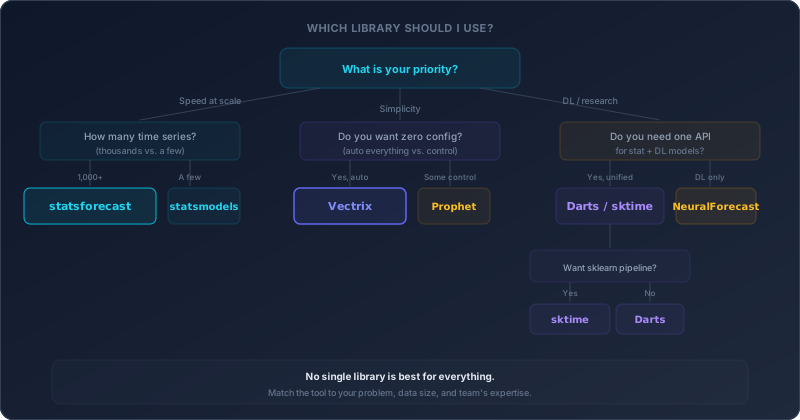
Rather than prescribing one answer, here are decision paths based on your situation.
“I’m new to forecasting and want to learn”
Start with Vectrix or Prophet.
Vectrix’s forecast(data, steps=12) gets you from zero to result in one line, with auto-selection handling the complexity behind the scenes. Prophet’s component plots are excellent for understanding what trend and seasonality look like in practice.
Then, once you understand the concepts, explore statsmodels to learn what happens under the hood — how ARIMA orders work, what exponential smoothing parameters mean, how to read diagnostic plots.
“I need to forecast 100,000 time series in production”
statsforecast, no contest. Nothing else comes close on pure throughput. If you need both statistical and ML models, combine with mlforecast from the same Nixtla ecosystem.
“I want to try deep learning for forecasting”
NeuralForecast for the widest model selection. Darts if you want to compare DL against statistical baselines in one framework. PyTorch Forecasting if interpretability (TFT) is a priority.
“I want the most accurate forecast with the least effort”
Vectrix. Auto-selection, auto-ensembling, auto-parameter-tuning — all in one call. The M4 benchmark results speak for themselves.
If you need deep learning’s cross-learning capabilities (many related series), combine Vectrix’s statistical forecasts with NeuralForecast’s N-BEATS or PatchTST.
“I need sklearn-style pipelines and cross-validation”
sktime. It’s designed for exactly this use case. Plug in any model from any library, wrap it in a pipeline, and use scikit-learn-style grid search.
“I want one library that does everything”
Darts comes closest. 46 models, foundation model support, anomaly detection, probabilistic forecasting — all in one package. Accept the heavier install and steeper learning curve as the price of comprehensiveness.
“I’m building a dashboard for non-technical stakeholders”
Prophet for the component plots and holiday effects, or Vectrix for the Forecast DNA profiling and business intelligence features (scenario analysis, backtesting, anomaly detection).
What We Learned from Building Vectrix
We’ll close with some hard-won lessons from building a forecasting library and benchmarking it against these alternatives.
1. Model selection matters more than model quality.
The gap between the best model for a given series and the average model is larger than the gap between any two libraries’ implementations of the same model. An AutoETS in statsmodels and an AutoETS in statsforecast produce nearly identical forecasts — but choosing ETS when your data needs Theta (or vice versa) can cost you 20–30% accuracy.
This is why auto-selection exists. And why libraries that force you to choose a model upfront are harder to use well.
2. Simple beats complex, until it doesn’t.
Across the M4 Competition’s 100,000 series, statistical methods dominated on yearly and quarterly data. Deep learning dominated on hourly data with complex multi-seasonal patterns. Neither camp swept all frequencies.
The right answer isn’t “always use statistical” or “always use deep learning.” It’s “match the approach to the data characteristics.”
3. Installation experience is underrated.
We spent considerable effort making pip install vectrix work on every platform with zero configuration. This seems trivial until you’ve watched a new user spend 45 minutes trying to install PyStan for Prophet, or debugging CUDA versions for PyTorch.
Three dependencies (NumPy, pandas, SciPy) means fewer things that can break. The Rust engine compiles into the wheel — users never see it.
4. Benchmarks keep you honest.
We publish our M4 results — including the honest numbers for every frequency group. We could cherry-pick our best results. We don’t, because transparency builds more trust than marketing.
When evaluating any library, ask for reproducible benchmark numbers. If they can’t provide them, that tells you something.
What’s Next?
You now know the lay of the land — what each library does, where each shines, and where each struggles. In upcoming posts
- Your First Forecast in Python — From zero to prediction in 15 minutes using real data
- Forecasting Models Explained — ETS, ARIMA, Theta, DOT, GARCH, Croston — what each one does and when to use it
- The Art of Model Selection — How auto-selection works and why it matters
The library you choose is just the starting point. What matters most is understanding your data, choosing the right approach, and measuring the result honestly.
Ready to try forecasting? Install Vectrix in 10 seconds and run your first forecast in one line of code.